For NYU undergraduates · Spring 2027

Find the courses you can take, and build a timetable that fits you.

Takeable checks every Spring 2027 section against your school's credit rules, your time zone and the hours you can be in class, then builds a timetable that fits. Every verdict says why, and what to do next.

No sign-up needed. An independent student tool, not an NYU service; course data from NYU's public class search and Bulletin.

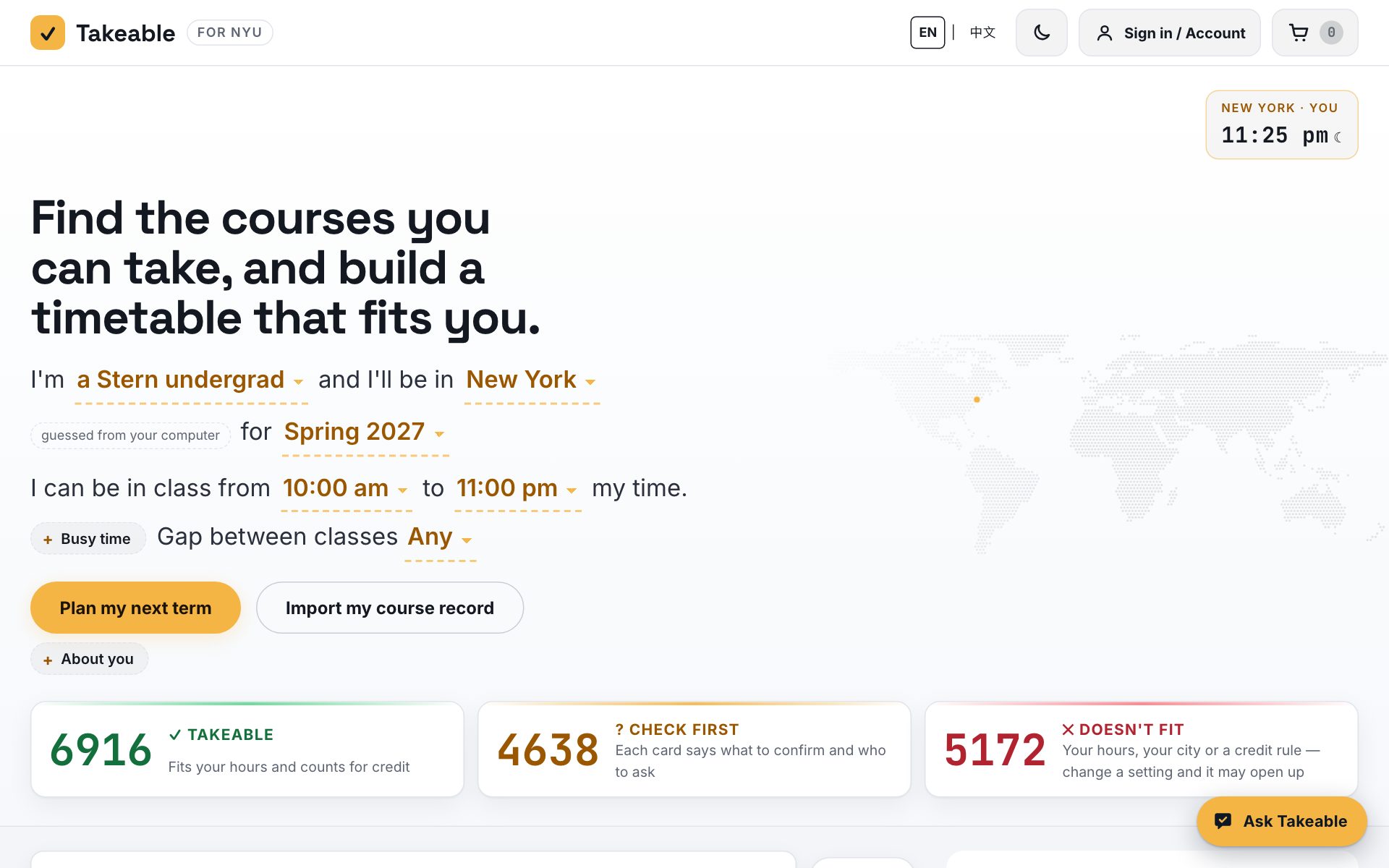
Takeable's home page: the one-sentence setup and every section sorted into Takeable, Check first and Doesn't fit
16,383Spring 2027 sections, every school's
11undergraduate schools' credit rules
446majors and minors from the Bulletin
1,973professors matched to their RMP rating
142sections whose own syllabus keeps exams under 30%

Everything you weigh before you register, on one page

Can I take it? A verdict with its reason

Each section is Takeable, Check first or Doesn't fit, on your clock and for credit at your school. "Starts 9:30 am, before your earliest 10:00 am" comes with a one-tap "Set earliest to 9:30 am"; a note that needs consent says whom to ask.
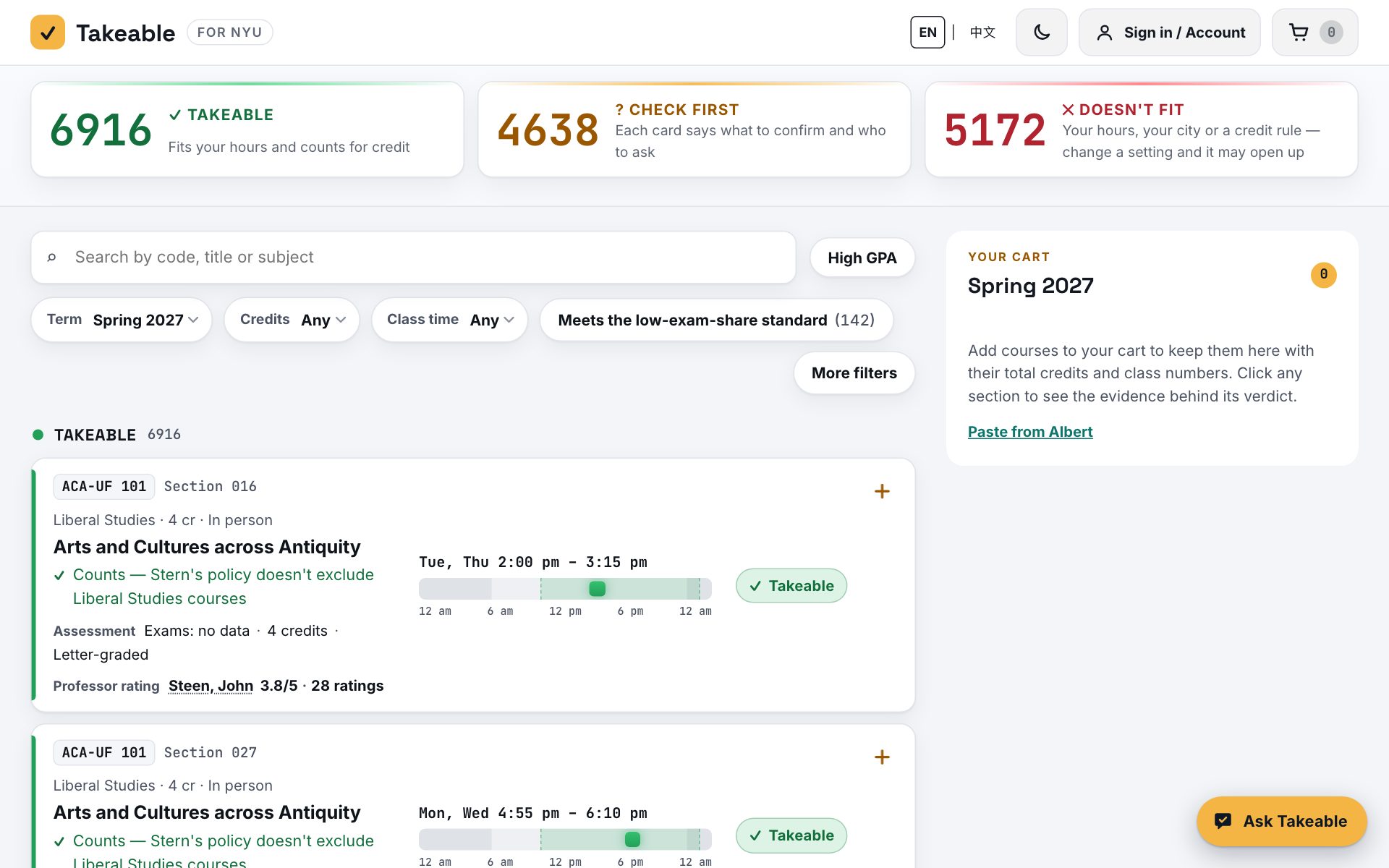
Course cards with their verdicts, reasons and professor ratings

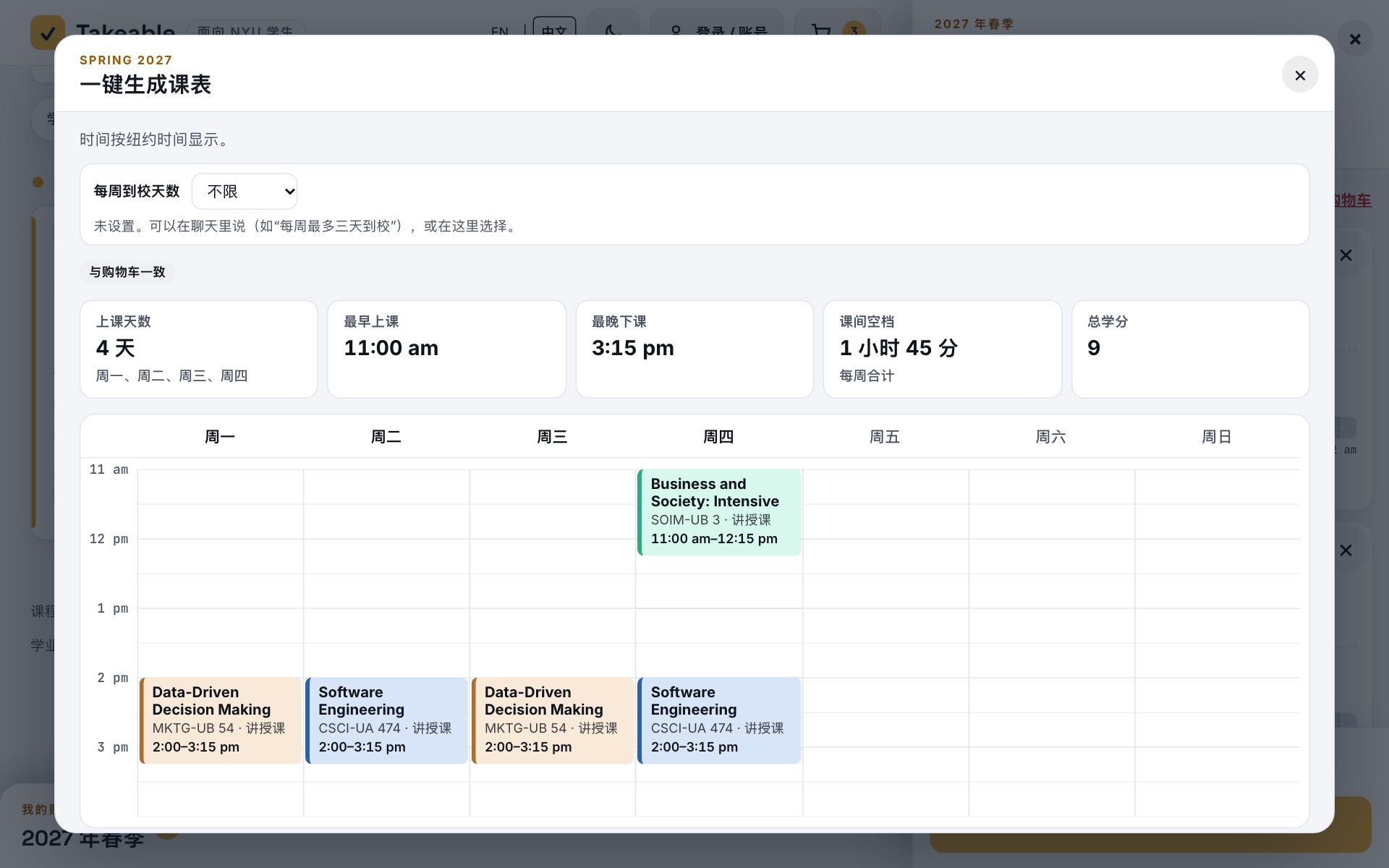
A one-click timetable

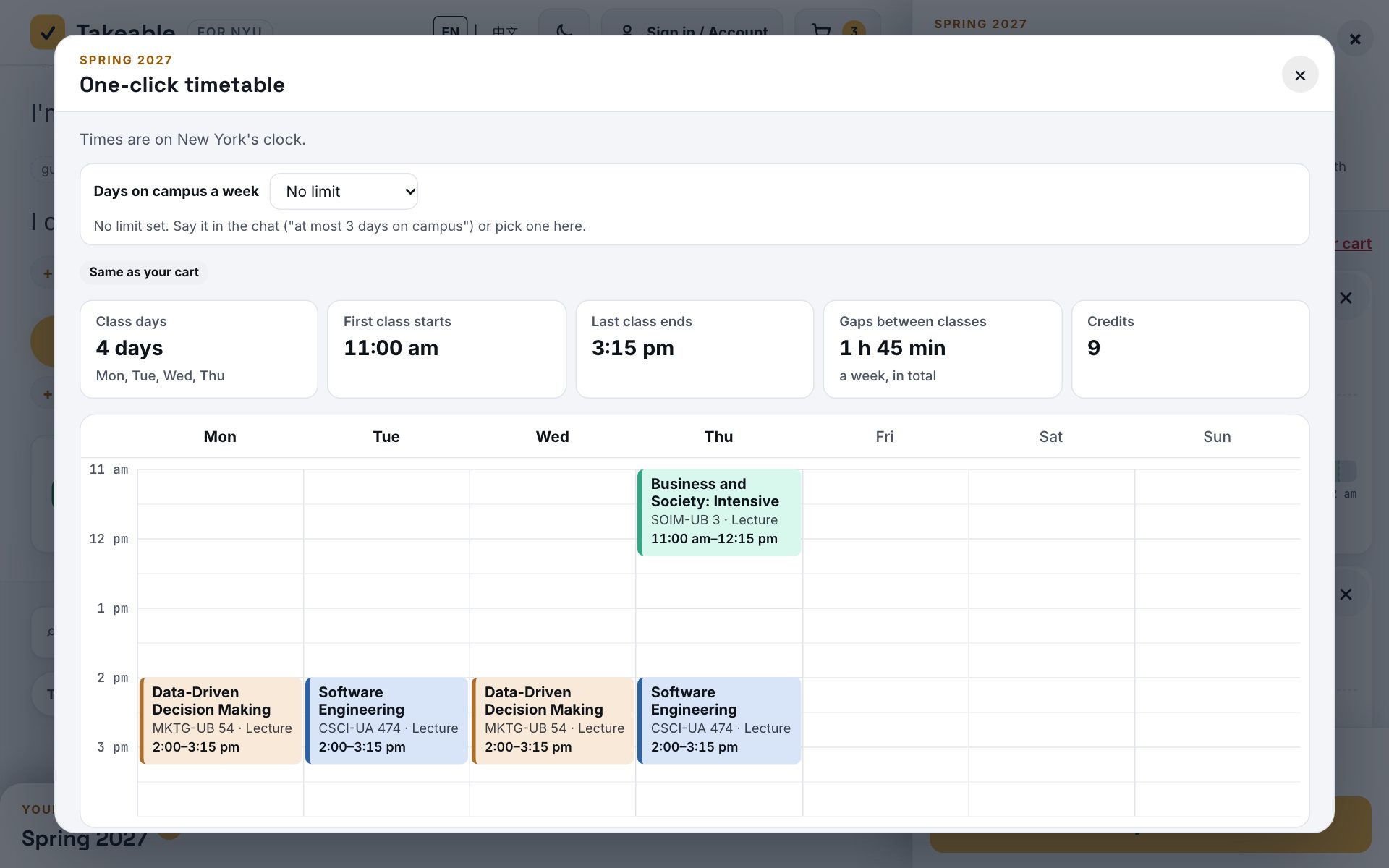
Pick courses, not sections: Takeable fits the lectures with their recitations and labs, keeps to the days on campus you set, and shows every switch as old → new. Lock a class or a professor and it stays put. Export to your calendar or copy the class numbers for Albert.

A generated weekly timetable

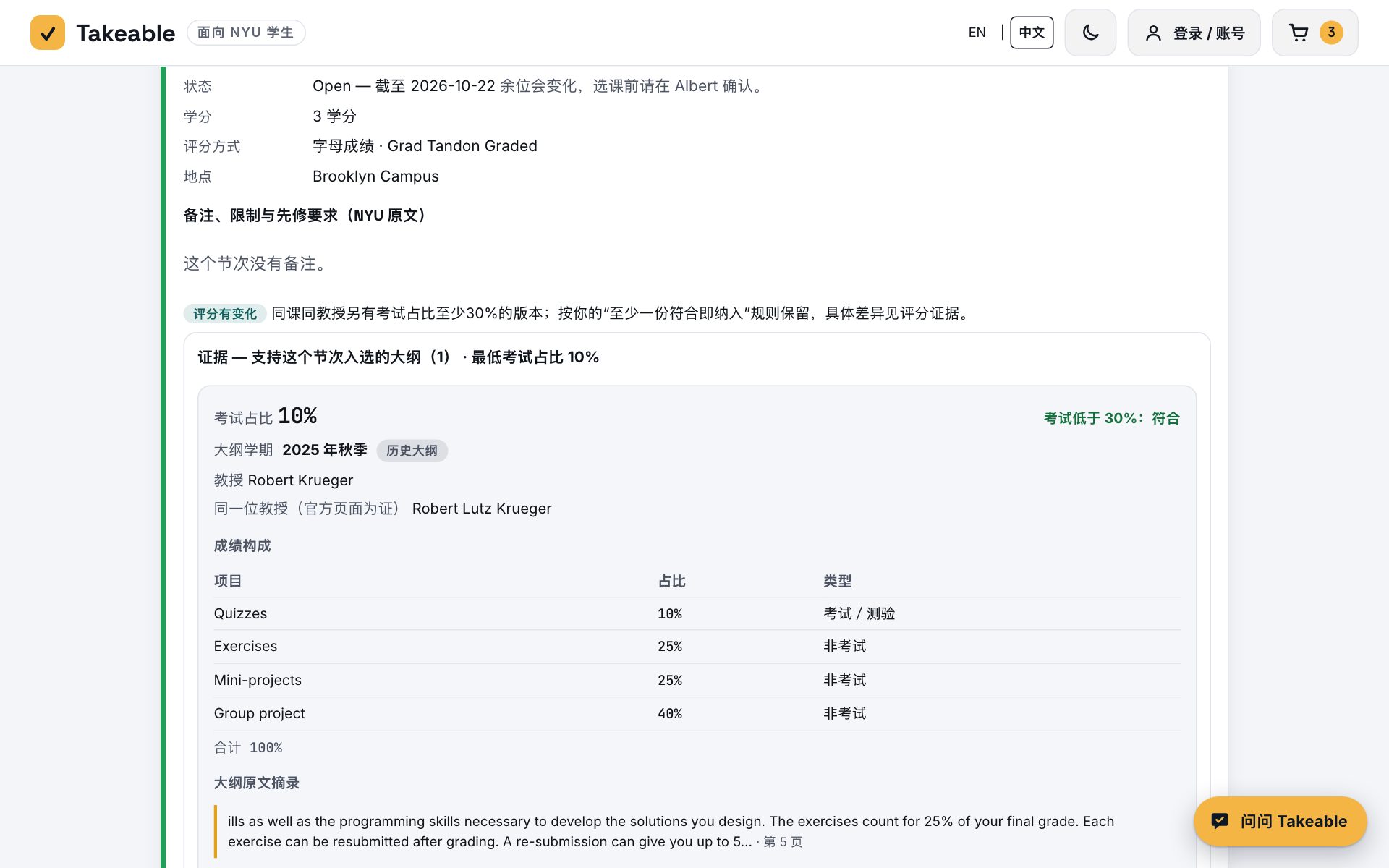
How the course is graded, from the syllabus

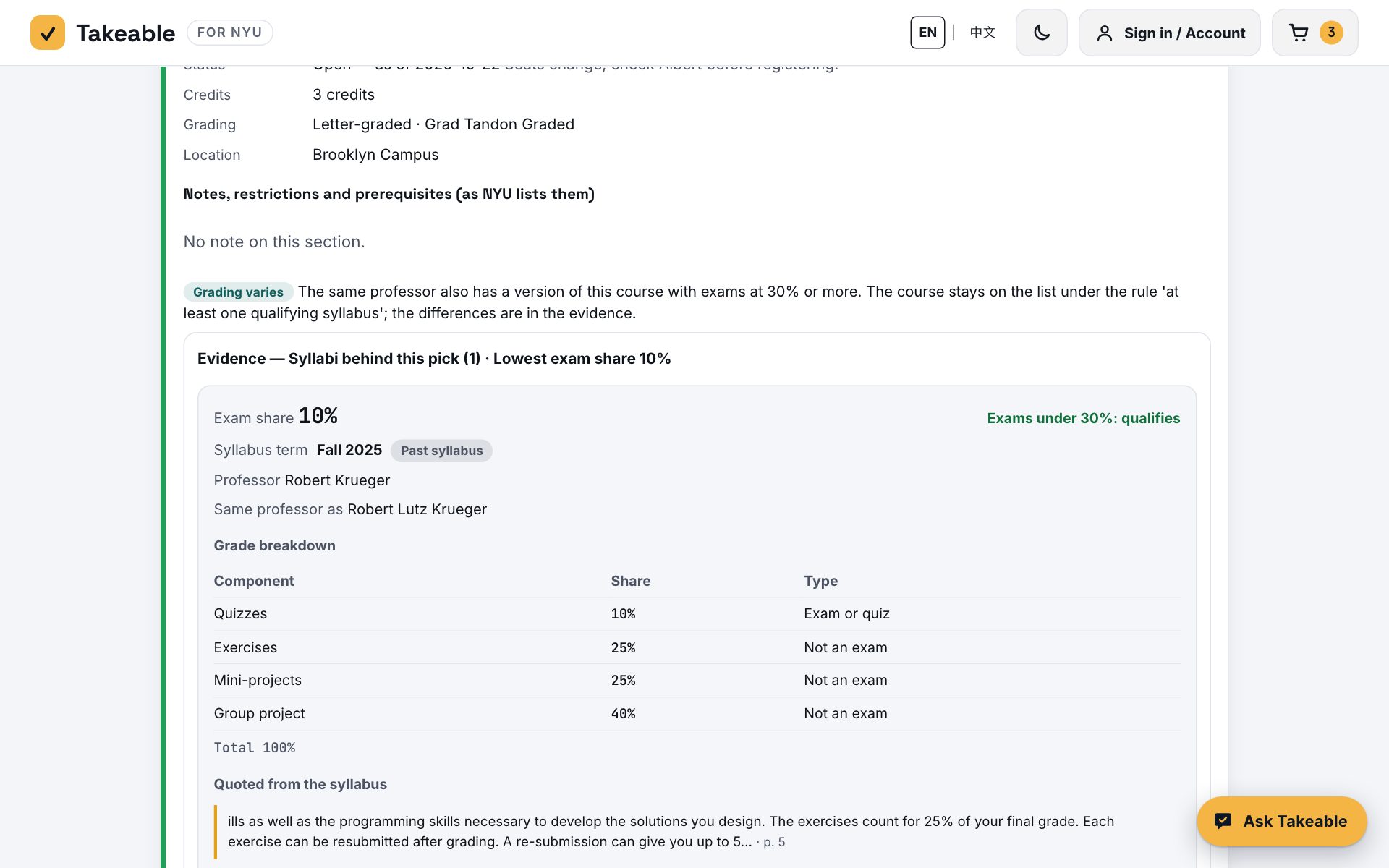
The High GPA list rests on the professor's own syllabus: every component with its weight, quoted lines, the syllabus's term, and a "≤" when only an upper bound is known. A past syllabus is labelled as past; a draft says draft.

A course's syllabus evidence with its exam share

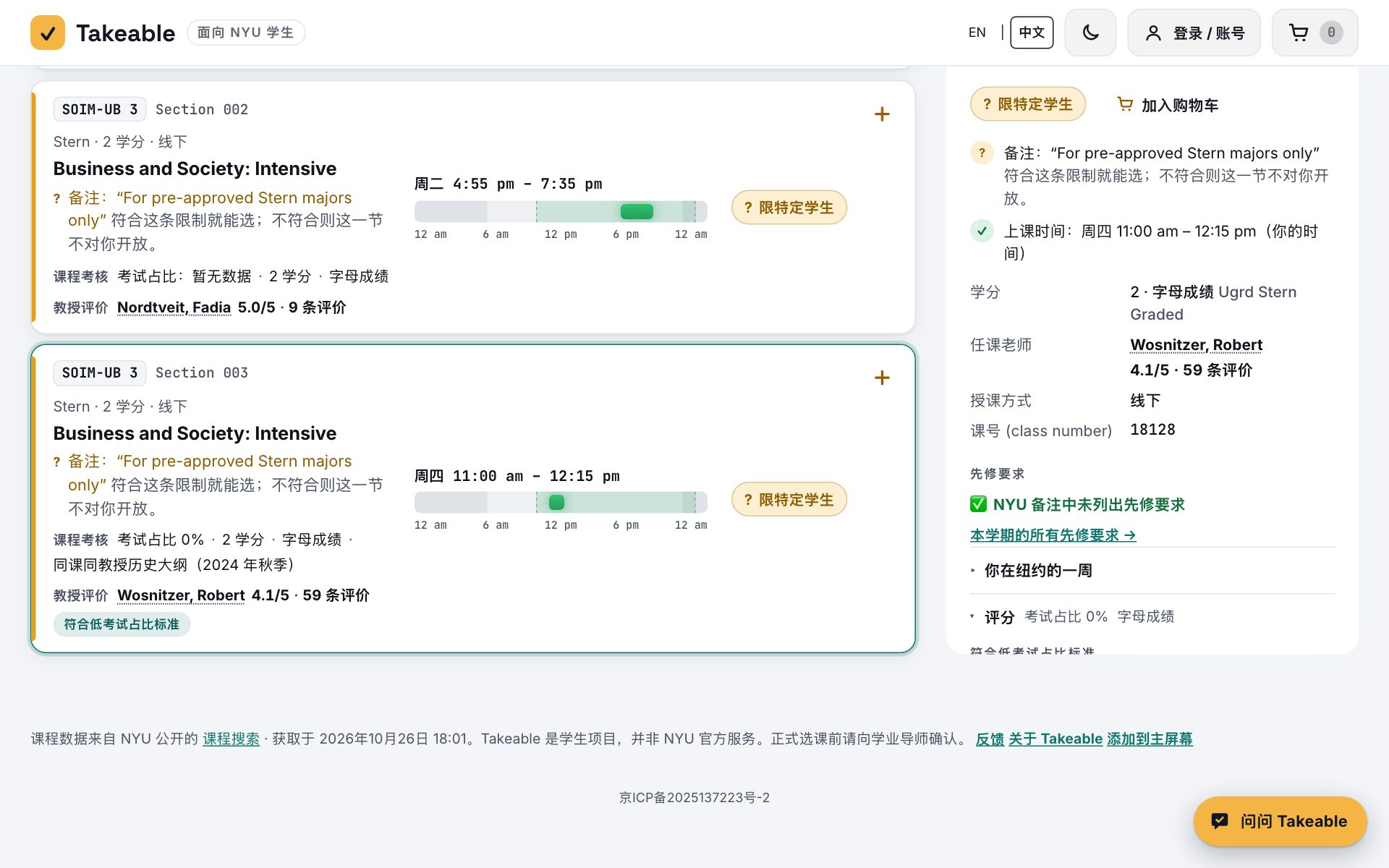
Everything about a section in one panel, professor's rating included

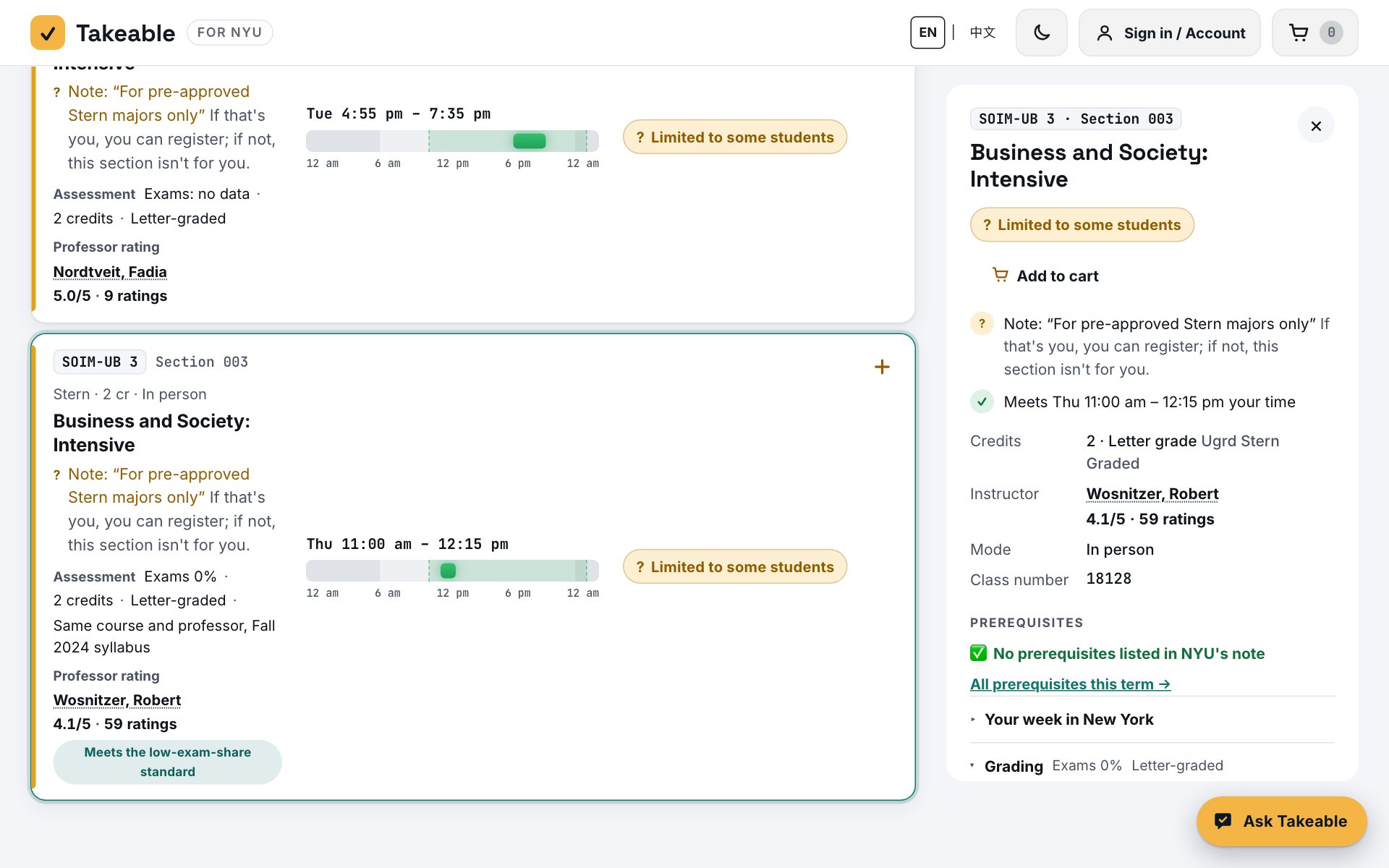
Times in New York and your own time zone, credits, grading, prerequisites and NYU's own notes, and the evidence behind the verdict. The professor's Rate My Professors score sits on the card with its number of ratings; 1,973 professors are confirmed to their profile by name, RMP school and department, and a name shared by several profiles is never averaged.

A section's details panel

Plan my next term

Pick your major and year: Takeable lists what the Bulletin still asks of you and what you can take this term.

Ask Takeable

A chat assistant that answers from the same data and turns the sections it names into cards you can add to your cart.

Find classmates

With your consent, see who else has the same course in their cart; emails are exchanged only when both agree.

How it works

  1. Say where you'll be. Your school, your city, the term and the hours you can be in class. Takeable guesses the city from your device.
  2. See what you can take. Every section is sorted and explained; filter by credits, time, exam share or rating.
  3. Build your timetable. Add courses to the cart and generate a schedule; copy the class numbers into Albert.
Start planning

Keep Takeable on your home screen

It opens like an app, full screen, one tap from your home screen.

Questions

Is Takeable an NYU service?

No. It is an independent tool made by a student, not affiliated with NYU. Its course data comes from NYU's public class search and Bulletin. Confirm in Albert and with your adviser before you register.

How fresh is the data?

Spring 2027 sections are from NYU's class search as of October 22, 2026. Seats change all the time and are not live here: check Albert for open seats.

Is it free? Do I need an account?

Takeable is free. You can use everything without an account; an account keeps your cart, timetables and chats across devices.

Does a low exam share mean an easy A?

No. It means the professor's syllabus weighs exams under 30%, as quoted. RMP scores are students' overall ratings across courses. Neither is a promise about grades.

Can I use it in Chinese?

Yes, every page is in English and Chinese, and it loads fast in mainland China too.

面向 NYU 本科生 · 2027 年春季

能选的课一眼看清,适合你的课表一键排好。

Takeable 把 2027 年春季的每一个节次,按你所在学院的学分规则、你的时区和你能上课的时间逐一核对,再帮你排出合适的课表。每个结论都写明原因,以及下一步该做什么。

无需注册。学生自制的独立工具,不是 NYU 官方服务;课程数据来自 NYU 公开的课程搜索和 Bulletin。

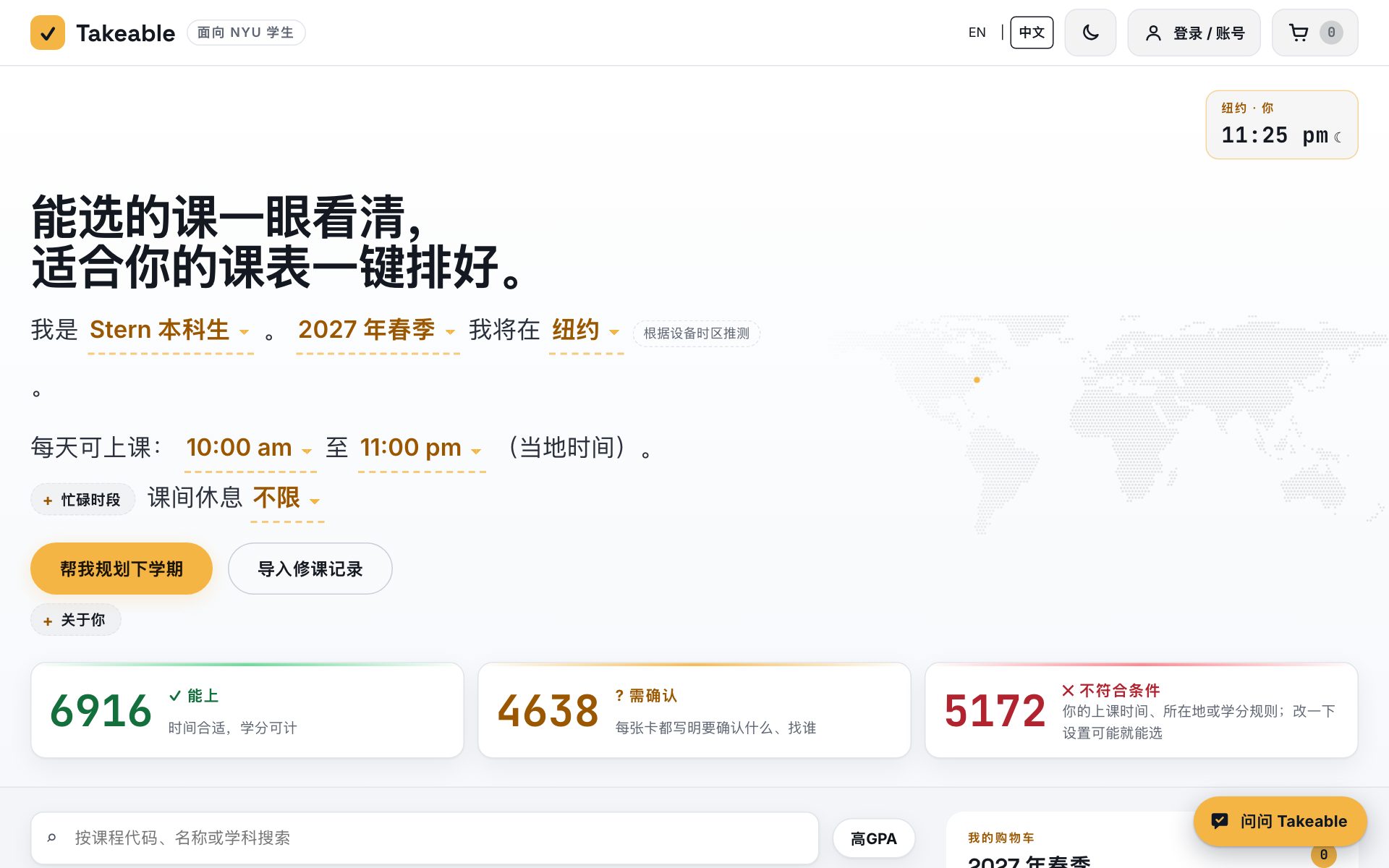
Takeable 首页:一句话设置,每个节次分为能上、需确认、不符合条件三组
16,383个 2027 春季节次,覆盖全部学院
11所本科学院的学分规则
446个 Bulletin 专业和辅修
1,973位教授已核实 RMP 评分
142个节次的教授大纲考试占比低于 30%

选课前要考虑的,都在一个页面

能不能上?结论带原因

每个节次都标为能上、需确认或不符合条件,按你的时区和你所在学院的学分规则判断。"上午 9:30 开始,早于你最早的 10:00" 旁边就有"把最早时间改为 9:30";需要许可的课会写明找谁。

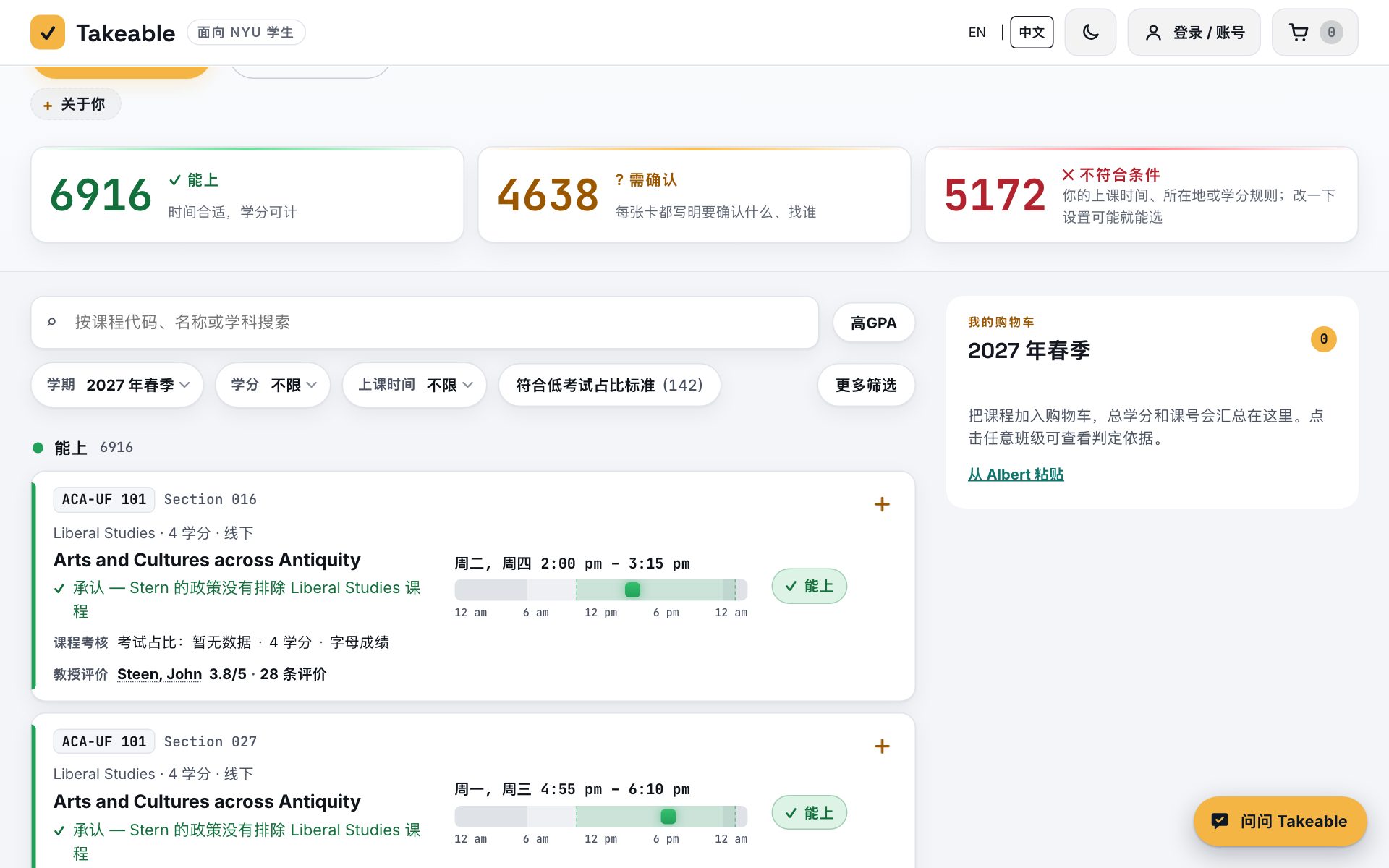
课程卡片:结论、原因和教授评分

一键排课

选课程,不用自己挑节次:Takeable 会把讲座和配套的讨论课、实验课一起排好,遵守你设定的到校天数,每次换班都显示"原 → 新"。锁定某节课或某位教授就不会变。可导出到日历,或复制课号到 Albert。

自动生成的周课表

考核方式,来自课程大纲

“高GPA”名单以教授本人的大纲为依据:每一项的权重、原文摘录、大纲所属学期;只知道上限时标"≤"。往届大纲标明是往届,草稿标明是草稿。

课程大纲证据和考试占比

一个节次的信息,一个面板看全,包括教授评分

纽约时间和你当地时间、学分、评分方式、先修要求和 NYU 原文备注,以及结论背后的依据。卡片上直接显示教授的 Rate My Professors 评分和评价人数;1,973 位教授已按姓名、RMP 学院和院系核实档案,同名的多个档案绝不取平均。

节次详情面板

帮我规划下学期

选好专业和年级,Takeable 列出 Bulletin 还要求你修的课,以及这学期能选的课。

问问 Takeable

AI 选课助手,用同一份课程数据回答问题,提到的节次可以直接加入购物车。

找课友

经你同意后,看到购物车里有同一门课的同学;双方都同意才交换邮箱。

怎么用

  1. 说出你的情况。学院、所在城市、学期和能上课的时间段;城市会根据设备自动推测。
  2. 看能选哪些课。每个节次都已分好组并写明原因;可按学分、时间、考试占比或评分筛选。
  3. 排出课表。把课加入购物车,一键生成课表;把课号复制到 Albert。
开始选课

把 Takeable 放到手机主屏幕

像 App 一样全屏打开,在主屏幕上一点就进。

常见问题

Takeable 是 NYU 官方的吗?

不是。这是学生做的独立工具,与 NYU 没有隶属关系。课程数据来自 NYU 公开的课程搜索和 Bulletin。正式注册前请在 Albert 和学业导师处确认。

数据有多新?

2027 年春季的节次取自 2026 年 10 月 22 日的 NYU 课程搜索。余位随时变化,这里不是实时的,请到 Albert 查看余位。

收费吗?需要注册吗?

Takeable 免费。不注册也能使用全部功能;注册后购物车、课表和聊天记录可以在不同设备间同步。

考试占比低就是容易拿 A 吗?

不是。它只说明教授的大纲里考试占比低于 30%(附原文)。RMP 分数是学生对教授所有课程的总体评价。两者都不保证成绩。

在国内能用吗?

能。全站中英双语,在国内打开也很快。